
Free extension for Chrome, Firefox and Edge
Save Web Pages as Visual Bookmarks
100% free, no registration. Organize links into categories and view everything in one clean dashboard.
4.4 out of 5 · 9 ratings on the Chrome Web Store Add to browser, it's free
 - Free, no premium plan
- No account needed
- Bookmarks stay in your browser
 Firefox
 Edge
EdgeEverything you need to keep the web organized
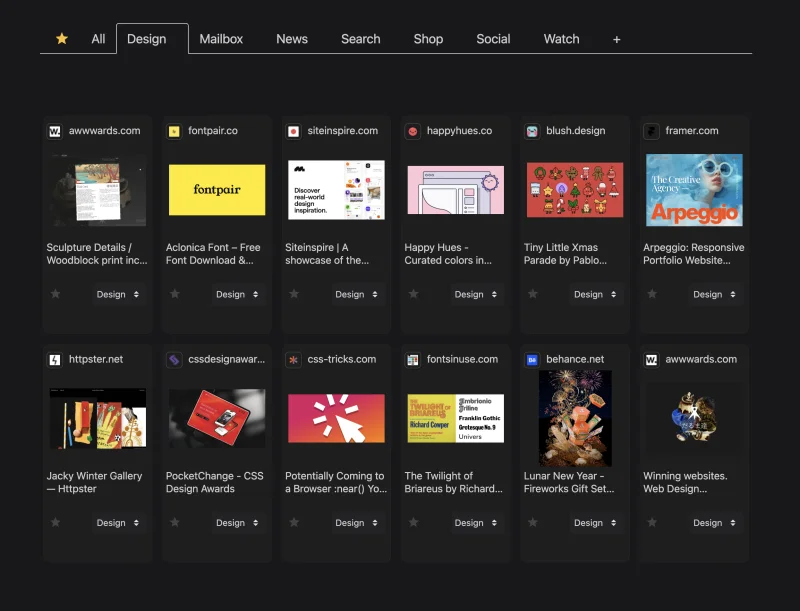
WebLinks turns the pages you want to keep into a visual board you can actually browse.
Visual bookmarks
Every saved page shows its picture, title and link, so you recognize it at a glance.
Unlimited categories
Group pages by project, trip or wish list, and filter your board in one click.
Favorites
Star the pages that matter most and find them together on their own tab.
Prices on product pages
When a product page shows a price, WebLinks saves it with the page so you can compare.
Share and import
Send plain links anyone can open, or a WebLinks code that keeps pictures and categories.
Your layout, your theme
Choose a light or dark theme and how many cards to show per row.
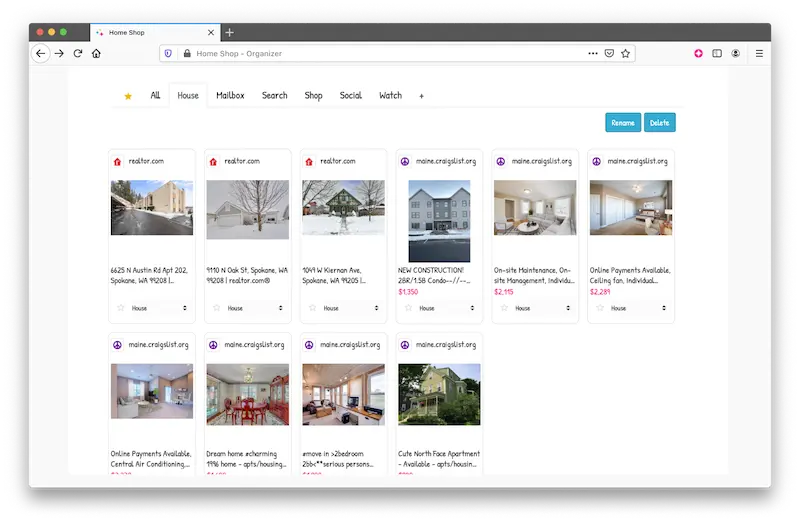
Create Unlimited Lists and Stay Organized

Buying a Home
Collect listings from multiple real estate marketplaces into one visual board.

Making Shopping Lists
Save products from Amazon, eBay, Flipkart, and any other site with prices and images.

Organizing Work & School
Bookmark any webpage and organize links into unlimited project categories.
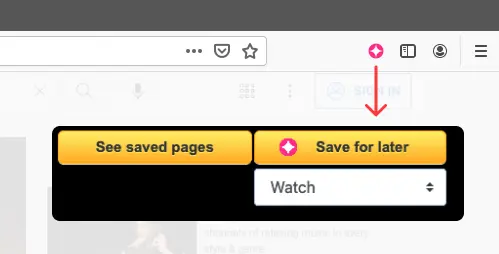
Easy as 1-2-3
- Click on the extension icon.
- Select the category.
- Click Save for later.
Private by design
WebLinks is built so that your bookmarks remain yours.
Stored in your browser
Your saved pages, categories and settings stay on your device. We never receive them.
No account, no browsing history
There is nothing to sign up for, and WebLinks only reads a page when you click to save it.
Usage statistics you control
Usage counts help us improve WebLinks. They contain no personal information and none of your pages, and you can turn them off in Settings.
Frequently Asked Questions
Is WebLinks free?
Yes, WebLinks is 100% free. There are no subscriptions, no premium tiers, and no hidden fees. All features are available to every user.
Do I need to create an account to use WebLinks?
No. WebLinks works instantly after installation with no registration or sign-up required. Your bookmarks are stored locally in your browser.
What browsers does WebLinks support?
WebLinks is available on Chrome, Firefox, and Microsoft Edge. It works on Windows, macOS, Linux, and Chrome OS.
How is WebLinks different from browser bookmarks?
Unlike browser bookmarks, WebLinks shows visual previews with images for each saved page. You can organize links into custom categories and see everything in a clean visual dashboard, making it easier to find what you saved.
Can I organize my bookmarks into categories?
Yes. You can create unlimited categories, star important links and filter by category. In Settings you can also choose a light or dark theme, how many cards to show per row, and what each card displays.
Does WebLinks collect my browsing data?
No. WebLinks never tracks your browsing history: it only reads a page when you click the button to save it, and your bookmarks stay in your browser. To help improve the extension, it sends usage statistics without personal information (for example, how many pages are saved). They never include the addresses, titles or content of your pages, and you can turn them off in Settings. See our privacy policy for details.
Can I share my saved links with others?
Yes. You can share one page, several selected pages or a whole category. Choose "Copy links" to get a plain list of titles and web addresses that anyone can open, or "Copy WebLinks code" for people who also use WebLinks: they paste it into Import and get the pages with their pictures and categories.
What can I use WebLinks for?
WebLinks is great for comparing products across shopping sites, collecting real estate listings from multiple platforms, organizing research for work or school, saving recipes, tracking travel ideas, and any other use case where you want visual bookmarks organized by category.
How many bookmarks can I save?
There is no limit. You can save as many bookmarks as you want and create as many categories as you need.
Does WebLinks work on product and shopping pages?
Yes. WebLinks automatically extracts product images and prices from popular shopping sites like Amazon, eBay, and many others, making it ideal for building shopping lists and comparing products.
Are my bookmarks backed up or synced?
No. Your bookmarks are stored only in this browser on this device, so they are not synced between computers and uninstalling the extension deletes them. To keep a copy or move them to another browser, select your pages, share them as a WebLinks code and import that code on the other side.